
What is an APN?
An APN (Access Point Name) tells your phone how to connect to the carrier’s network for mobile data. If the APN is incorrect or missing, you’ll have no internet/data even though the eSIM is installed. 
In many cases the phone will auto-configure, but many Android devices (especially Google Pixel, Samsung etc.) do not auto-set or reset the APN on reboot. 
So manually setting to bicsapn removes the uncertainty.
How to set your APN for your Orbit Mobile eSIM?
Must-do: After installing your eSIM, manually set the APN to bicsapn to ensure mobile data works correctly.
? Step-by-step (one step at a time):
1. Go to Settings on your Android phone.
2. Tap Network & Internet (or Connections, depending on your device).
3. Tap SIMs (sometimes called SIM manager).
4. Select the Orbit Mobile eSIM profile.
5. Tap Access Point Names.
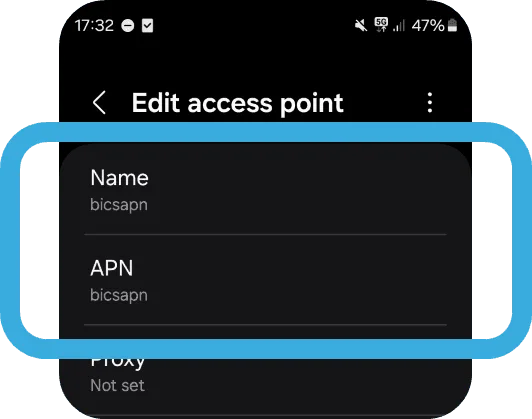
6. If you see an existing APN named “bicsapn”, tap it.
If not: tap Add or the + icon to create a new APN, then enter:
• Name: bicsapn
• APN: bicsapn
Leave all other fields blank or at default.
7. Once set, select the bicsapn APN so it’s active.
8. Restart your phone (or toggle Airplane Mode ON → OFF) to apply the change.
✅ Check & troubleshoot:
• Confirm that mobile data is enabled for the Orbit Mobile eSIM.
• Confirm that data roaming is turned ON (especially if you’re abroad).
• If you still don’t have data: return to Access Point Names, ensure the active APN is exactly “bicsapn” (spelling matters).
• On some Google/Samsung devices, the APN may reset after reboot or network change — so check again if you restart your phone.
• If multiple APNs exist, delete duplicate or irrelevant ones (to force the device to use bicsapn).
• If nothing works: reinstall the eSIM profile (using your QR code) and repeat the steps above.